Swapmamas.com, like Kashless, is another way to get rid of things you don't want and pick up some nice freebies that you could use. What I find most useful about the site is that the items for trading are listed in different groups, or circles, as SwapMamas calls them. So, if you are only interested in baby clothes or craft supplies, you won't have to slog through a whole bunch of listings for old windows and broken computers. You can also swap items like gift cards and grocery coupons. I joined the gift card swap circle, and offered up a $15 Best Buy gift card, looking for Target, Bed Bath & Beyond, or similar cards in return. So far, no takers. But, the idea is cool.
You can work out a trade with someone who has what you want and wants what you have, or you can give your items to one swapper and get items from another. The giver pays shipping, and gets karma in return (their wording, not mine). The hope is that swappers would be both GIVERS and GETTERS.
SwapMamas goes one step further, adding a social component. To quote from their website, "It's about getting to know other parents, making connections, and doing a little old school trading with friends." I'm not wild on this aspect of the site, to be honest. If I want friends, I'll log in to Facebook. I don't have time to build a social network on a site that is solely for swapping freebies.
I'll let you know if my gift card swap ever pans out. But, in the meantime, take a look at SwapMamas.com and see what you think!
Showing posts with label recycling. Show all posts
Showing posts with label recycling. Show all posts
Friday, March 5, 2010
Wednesday, March 3, 2010
Kashless.org
(Real-life Frugality has been overrun with real life lately. While I'm always busy, the past month or so has seemed particularly overwhelming. With things calming down a notch or two, I am once again making a committment to devote more time to this blog. Wish me luck!)
Recently, I've come across a number of websites for trading, bartering, and giving things away for free. I'll be profiling one such site today, with more to follow.
The first site I investigated is Kashless.org. You have to become a member (sign up with an email address and password) to view details on any of the items listed. Once you join, you find the Kashless list for your area, and start browsing. There's everything imaginable on here, from free fill dirt to baby clothes to car parts. Lots of the things that I've seen are listed as broken, or needing some sort of part. (One person listed a printer because it ran out of ink--OK, whatever!) But, if you are willing to search and really get into it, you can find the gems. Kashless also has a reward point system, where you earn points for doing things like posting items to be given away, inviting people to join Kashless, etc. You can then redeem these points for products and coupons. This is Kashless' incentive for extending the life of a product and eliminating waste.
I haven't actually listed anything, or found any thing I needed, but that's only because I haven't had the time. Give it a try, and let me know what you think!


Sunday, October 11, 2009
Furniture Recycling
My hubby is a very accomplished woodworker. We have a garage full of wonderful woodworking tools. He has saved us lots of money by making custom furniture for our home.
 In 2002, he built this custom entertainment center for our new-at-the-time TV. He made it out of birch plywood that he bought at an estate sale for literally pennies on the dollar. When we replaced our dead TV, he went for the maximum size he could squeeze into our family room, and none of the ready-made entertainment centers worked.
 He trimmed the plywood with solid oak and finished it with satin-finish Varathane.
Then, in 2008, he bought a new flat-screen TV. Suffice it to say, he doesn't exactly buy into my "don't upgrade technology until you have to" mentality (see yesterday's post). He pined for a HD TV for ages. I, being the frugal spouse, told him the TV could not come out of our family budget, so he faithfully saved his personal spending money, and earned extra money doing handyman work for his parents, and bought the TV of his dreams. He built a new entertainment center out of the old one (recognize the doors on the bottom)?
 He added a few new pieces of wood for supports, but those came right out of his wood collection in the garage. He even had enough Varathane to refinish it.
 It's very pretty, and very functional. My favorite part is that we have now gotten two very nice pieces of furniture out of one set of materials.
Now, I am not advocating that you all fill your garage with woodworking tools and equipment, but I am saying that it can be fun and very economical to take things from your home that you no longer need, or that no longer work for their intended purposes, and find newn ways to use them, remodel them, or upgrade them. I'd love to hear about any recycling or reinvention projects that you've taken on.
Thursday, September 10, 2009
Printing Coupons
You can print coupons from any of the sites I've mentioned in the past few posts on either a black & white or color printer. I prefer a color printer, as there are several security features on the coupons that I think look better in color (and are therefore more easily redeemed).
One thing I ALWAYS do when printing coupons from the Internet is print them on the back side of paper that has already been used. In so doing, I make sure that there is no information on the scratch paper that could identify my family.
One thing I ALWAYS do when printing coupons from the Internet is print them on the back side of paper that has already been used. In so doing, I make sure that there is no information on the scratch paper that could identify my family.
Thursday, August 20, 2009
3R Technology Followup
This is the week of followups, or in other words, I am really kind of hitting a brick wall coming up with new frugality ideas. But, to revisit a post I wrote last summer about 3R Technology, I just wanted to report that I went back there again this week to buy another used HP printer, this time a HP LaserJet 2100 with less than 50,000 pages printed, for the bargain price of $20.00. This printer replaces a 17-year-old HP LaserJet 4P that we bought new for just under $1000 (and that was considered a bargain) in 1992. Going from 4 pm (on a good day) to 10 ppm has already made my hubby a happy guy. And, the price was right. There's a lot of life left in this new-to-us printer, and I feel really good knowing that we'll be benefitting from it for years to come.
Thursday, April 30, 2009
Recycling Books
I just signed up on a great website called Bookins. It is a website for trading used books and DVDs. It works really well--you post the books that you have for trade and each book is given a point value (most of the ones I have listed for trade are worth 6 points). You can also create a list of books that you are looking for.
When someone wants to get one of your books, they pay $4.49 to Bookins, and Bookins notifies you and sends you a postage label that you print and use to ship the book (I am assuming they are sending everything via media mail). The postage costs you nothing, and the point value of your book is added to your account.
When you want to get a book for yourself, you buy it with your accumulated points and pay $4.49 for shipping. Buyers and sellers never "meet" or communicate, it is all handled through Bookins.
I think this is a fun idea, and a great way for getting rid of old books and picking up new ones for very little cost. In the past I had sold books at used bookstores (i.e., Half-Price Books) but lately have been getting less and less for them. This looks like a better way.
Unbelievably, about 90 minutes after having posted all my books that I wanted to trade, I had takers for two of them. I got an email with a link that allowed me to print up a media mail postage label. I packaged the books in used padded envelopes (as they suggested) and they are ready to go out in the morning mail. I got 13 points for the transactions, which I can use to get more books.
Saturday, September 20, 2008
Uses for Page-a-Day Calendar Pages
This is a post I've wanted to write since I first started this blog, but I never found the time to take the pictures before now.
For several years, Santa has left each of us a page-a-day calendar in our stockings. Every family member gets one that fits their interests. The first calendar I ever got was a Mary Engelbreit one, and I just adored the full-color illustrations.
 It seemed a shame to either recycle them, or use the backsides for taking phone messages (which we do with our black-and-white calendar pages), so I found something new to do with them: decoupage!
 Using just some Mod-Podge, a foam brush, and a pair of scissors, I used the pages to make all sorts of useful, attractive containers. Just cut, glue, overlap as you'd like until the entire surface is covered. Then paint over the entire surface with decoupage glue, wait 24 hours, add a second coat of decoupage glue, and there you go!
 I wrapped the decoupaging over onto the bottom of the boxes to give it a clean look, then covered the bottom with a piece of felt. These are some inexpensive papier-mache boxes that I bought on sale at Michaels. I've also used the photo-file boxes that you can get for a buck or two at Michaels.
 I have also used this technique on boxes that I have gotten other things in (large boxes of business-sized envelopes are great). I keep most of my scrapbooking supplies in these boxes, which look cute on my computer desk shelf.
 I even covered a cardboard magazine holder to use on my kitchen counter as a paper recycling bin. It's much easier to put paper to be recycled here, then empty it in the big garage bin when it gets full.
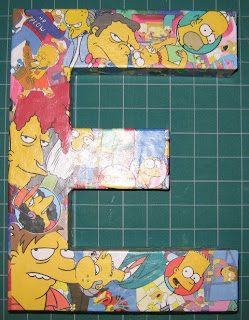
 This past winter, I found some really awesome papier-mache letters at JoAnn. I did up my initials in Mary Engelbreit pages and took them to my office. My boys liked the idea so much that they had me do letters for their room. My youngest chose his Frogs calendar pages (sorry, the picture is a little hard to see because of the flash).
For several years, Santa has left each of us a page-a-day calendar in our stockings. Every family member gets one that fits their interests. The first calendar I ever got was a Mary Engelbreit one, and I just adored the full-color illustrations.
 It seemed a shame to either recycle them, or use the backsides for taking phone messages (which we do with our black-and-white calendar pages), so I found something new to do with them: decoupage!
 Using just some Mod-Podge, a foam brush, and a pair of scissors, I used the pages to make all sorts of useful, attractive containers. Just cut, glue, overlap as you'd like until the entire surface is covered. Then paint over the entire surface with decoupage glue, wait 24 hours, add a second coat of decoupage glue, and there you go!
 I wrapped the decoupaging over onto the bottom of the boxes to give it a clean look, then covered the bottom with a piece of felt. These are some inexpensive papier-mache boxes that I bought on sale at Michaels. I've also used the photo-file boxes that you can get for a buck or two at Michaels.
 I have also used this technique on boxes that I have gotten other things in (large boxes of business-sized envelopes are great). I keep most of my scrapbooking supplies in these boxes, which look cute on my computer desk shelf.
 I even covered a cardboard magazine holder to use on my kitchen counter as a paper recycling bin. It's much easier to put paper to be recycled here, then empty it in the big garage bin when it gets full.
 This past winter, I found some really awesome papier-mache letters at JoAnn. I did up my initials in Mary Engelbreit pages and took them to my office. My boys liked the idea so much that they had me do letters for their room. My youngest chose his Frogs calendar pages (sorry, the picture is a little hard to see because of the flash).

My oldest chose The Simpsons, which I think turned out really great. Both boys have these sitting on the top of their bookshelves in their rooms. These letters are about 12 inches tall, and they come in larger and smaller sizes as well.
I have at least 8 of these decoupage boxes at home, and have given many as gifts as well. They are fun to make, very inexpensive, and definitely frugal!
Monday, September 15, 2008
Getting the Most Out of Your Inkjet
A friend and reader of this blog gave me this great idea for saving ink when printing out things on your inkjet printer that don't necessarily need to be at photo quality. She uses the draft black & white mode for printing things like online shopping receipts, boarding passes, etc., essentially anything that doesn't need to be in color. I like this idea! I'll be using it lots, I am sure, especially for those things that I mentioned in a previous post that I print on the backside of previously used paper.
She also had a question, which I will post to all of you to see if you have an answer (because I don't). She wanted to know if there's a good source for getting refills of your inkjet cartridges. I used to go to Island Inkjet (when they had a location in my mall) when I had a Lexmark printer and the refills worked just great. However, my HP 3-in-one machine is very particular about what ink you use. I tried a refilled cartridge once, and it gave me a warning error that I had to clear for each page of a print job. I didn't even use up the entire cartridge!
So, if anyone can give some advice on reliable sources of refills for inkjet cartridges, give a shout and I will post them here.
Friday, August 22, 2008
Lessons In Savings from Cathy Guisewite
The comic strip, Cathy, has a very funny series going on right now about "lessons in savings." I can relate to many! I particularly like this one, as it deals with something that I do (you may need to click on the image to be able to read the text):


Using the back of envelopes for lists and notes is one of my favorite ways to get another use out of something destined for the recycle bin. I open my envelopes with a letter opener so the edge is nice and neat, then I use them for my grocery lists when I am going to the store. The envelope is the perfect place to put all my coupons (and those of you who read my blog know how many coupons I can be carrying at any time), plus the envelope is sturdier than a single piece of paper which makes it easier to cross off the items on the list.
While I do embrace many technological advances, I still have a Franklin planner that uses paper (amazing, huh)? I save my daily pages and use the blank side (if I haven't written notes on them already) for making my menu list to post on the fridge, as well as the running grocery list that I keep on the fridge between trips to the store (before I transfer the list and the coupons to the envelope), as well as for general notes that I need to take or leave around the house.
Wednesday, August 6, 2008
Printing on Both Sides of Paper
It's been about 30 years since the term "paperless office" was first coined. I remember quite a few years ago Bill Gates declaring that the paperless office was just around the corner. Well, maybe not so much. For a while, if anything, I think computers, printers, copiers, and fax machines caused people to use more paper, not less. This article, though a couple of years old, was very interesting to me as I researched this blog entry. It talks a lot about the advances that have happened lately to make the paperless office more of a reality.
I work in the publications department of an environmental consulting firm, and over the past 14 years I have definitely seen a trend away from generating multiple copies of a 500-volume in favor of sending the same information electronically in PDF form. Still, our office tends to go through an incomprehensible number of reams of paper each year.
For years at work, and more recently at home, I have been saving paper that has been printed on one side, that would normally just be headed to the recycle bin, for use a second time. I keep the paper in a tray on my computer stand, right next to the unused paper. Here's some of the things I print on the backside:
- E-mail messages (though only when absolutely necessary)
- Online banking confirmations that I am just going to shred when the statement arrives
- Online shopping receipts
- Weekly lists from the Grocery Game
- Grocery coupons found online
- A copy of my boys' weekly schedule I give my mother-in-law
- My weekly Young Women's lesson from lds.org
- Directions that I have searched for online
- Grade reports for my kids.
You get the idea. Essentially, if it is anything that I need for personal use that will likely just end up in the recycle bin anyway, I toss it on the backside. Even if I decide to save any of these things, the fact that there is something on the backside is usually not that important.
Friday, July 4, 2008
Technology Reuse--A Great Deal for All Involved
On Tuesday, I took a little trip to the SoDo area of Seattle to buy a used HP LaserJet 1100 at a great place called 3R Technology. I needed a new laser printer for the swim team, and with little budget and the constraint of having to connect it to an antiquated laptop loaded with Windows ME, I decided to go for a used printer. 3R Technology had posted the 1100 on craigslist.
Not only am I thrilled with getting a great deal on the printer ($15), I was really impressed by their entire business. 3R Technology provides technology recycling and remarketing services. Their primary focus is developing donation and reuse channels, and proper handling and recycling of computer equipment. I'm a big believer that, even with computers and peripherals, one ought to "use it up, wear it out." Why pay big bucks for a brand new printer when a used printer with plenty of life left will do the trick?
Plus, Andy was incredibly friendly and helpful. I'll definitely be doing business with them in the future (come to find out, even though the 1100 was originally supported on ME, HP no longer provides ME drivers...a good excuse to finally upgrade to a laptop running XP). If you are in the Seattle area, I highly recommend them.
Monday, June 30, 2008
Start Spreading the News(paper)
Friends in the neghborhood have recently re-done all the flower beds and planting areas in their yard. They were going whole-hog, getting all new plants and ordering a huge load of beauty bark. The person helping them plan the project suggested that instead of using landscape fabric to control weeds, to use newspaper instead. Not only is it cheap (or free--I saved about 10 days' worth of daily newspapers for them, and it was more than enough), it is easy to use...just tear a hole where you want your plant to come through, controls weeds every bit as well, and eventually decomposes, adding nutrients to the soil. I asked yesterday how the project was going, and they were very pleased with how easy the newspaper was to work with, and how well it controls the weeds.
A friend in Utah says that she takes her newspapers to the school recycle bin, because the school makes money from it. She keeps a bin in the back of her Suburban, and once it's filled, she drops it off at the school. I know around here, with curbside recycling being so common, many schools don't use newspaper recycling as a fundraiser anymore, but in places where curbside recycling is in its infancy, taking the newspapers to school is a great idea.
One little anecdote about newspaper recycling from my husband's growing-up years. When he was a teenager, Bellevue was in the Oakland, California, temple district. To raise money to go to the temple to do baptisms, the youth in his ward did a newspaper drive. They each were assigned a huge amount (tons, I believe) to collect. Time was drawing short, and my hubby, despite his best efforts, had not met his quota. One day, he was out in the neighborhood and for some reason decided to stop at a house and ask about newspapers. The homeowner was thrilled, and said: "Boy, do I have newspapers for you!" He proceeded to open his garage, which was stacked floor-to-ceiling with old newspapers. It took his mom several trips in her old Pontiac station wagon to collect all the newspapers.
Subscribe to:
Posts (Atom)